
SharePoint site size report by folder (free)
Running out of storage?
Let our team build your storage cleanup plan
We find what is driving your storage use, set version-history and retention policies that fit your organization, and help you avoid buying extra storage.
"The site is 480 GB" is not an actionable fact. "The Engineering > CAD > Archive folder is 310 GB of that" is. Getting from the first sentence to the second is the entire job of a folder-level size report — and SharePoint does not give you one out of the box.
SharePoint Smart Storage Analyzer is a free, MIT-licensed SPFx web part that does. It runs on a page in the site, under your own account, with Site Owner rights.
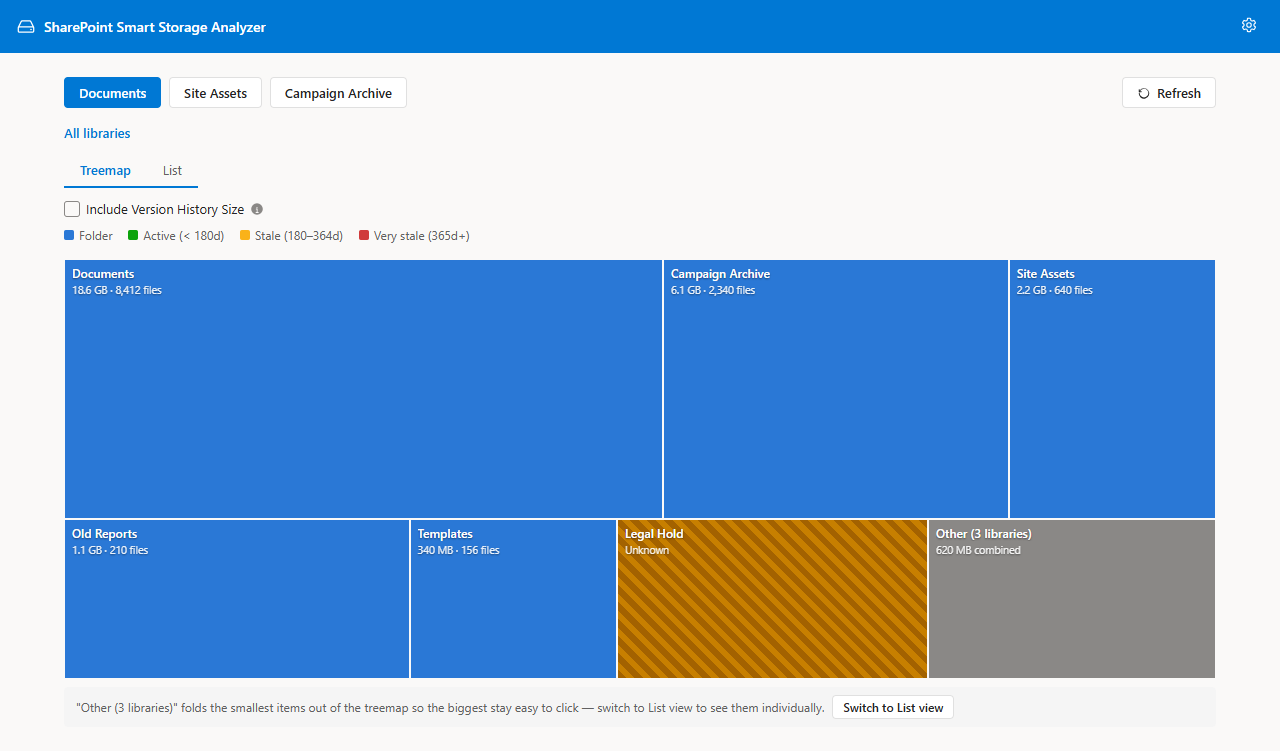
Start with the treemap
The treemap draws every folder as a rectangle sized by the bytes it contains. Nothing communicates "this one subtree is the problem" faster, and clicking drills straight into it.
Switch to the list when you need numbers
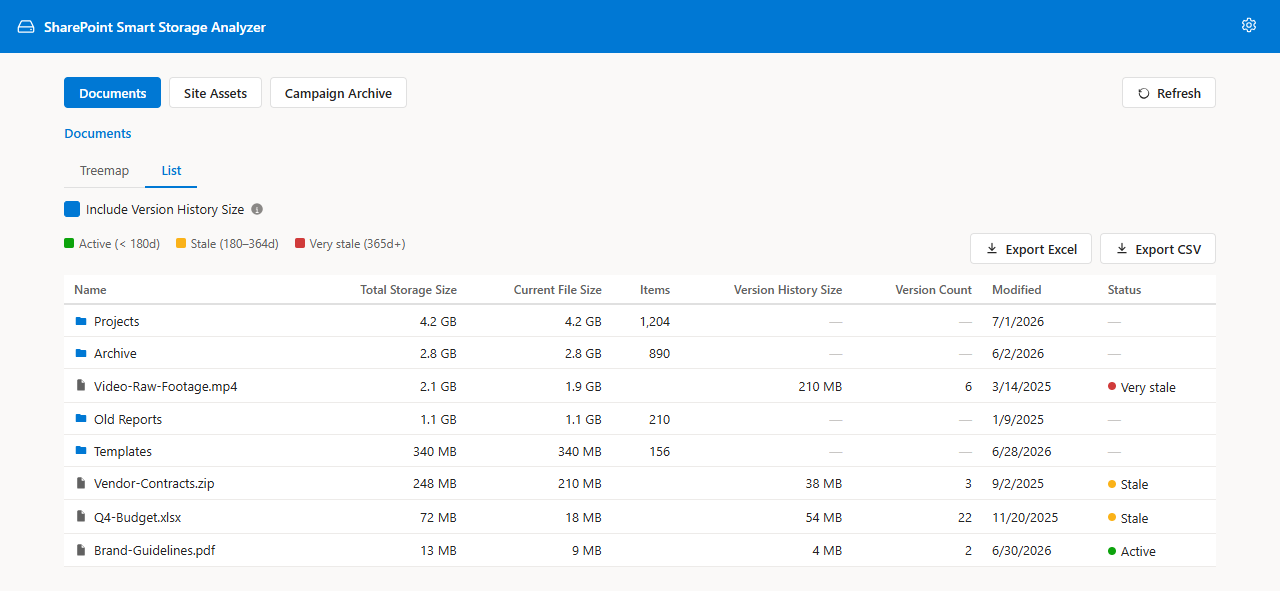
Proportions are for finding the problem; numbers are for writing it up. The list view gives sortable folder totals and item counts you can quote in a ticket.
Export the Storage Report
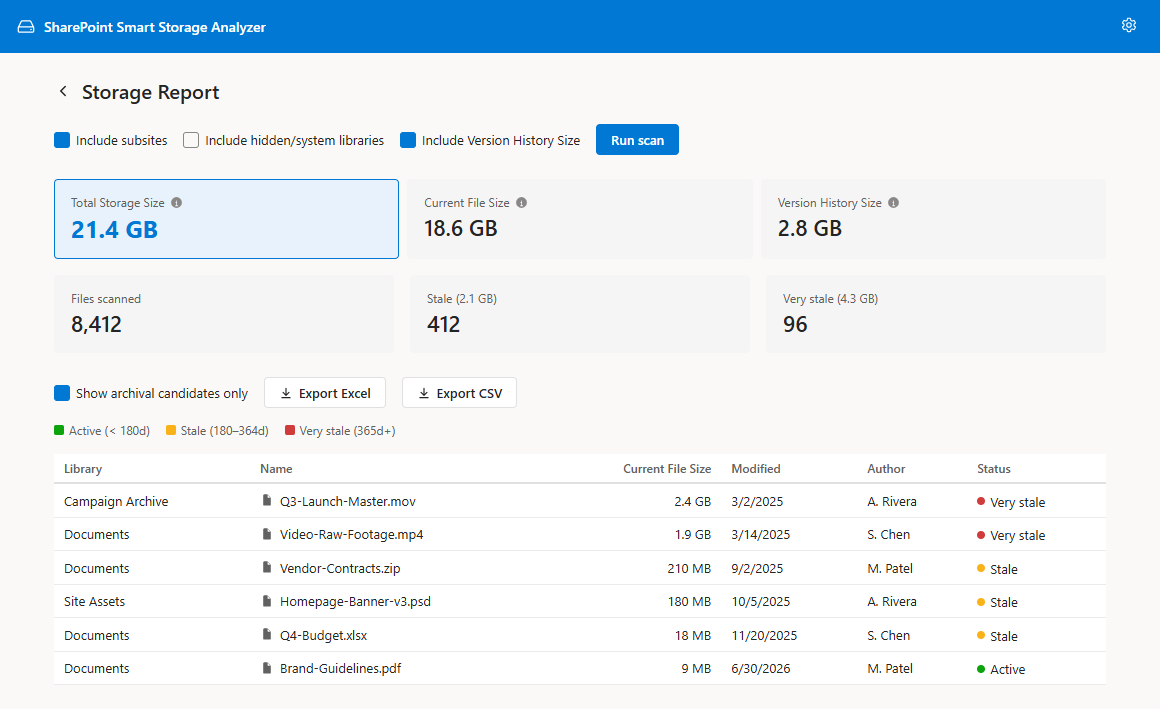
The Storage Report runs the same breakdown across the whole site and exports to Excel or CSV, which is what you actually hand to a site owner or a finance chargeback process.
Where version history fits
Folder totals are a precise sum of current file content — they deliberately exclude version bytes, because SharePoint offers no recursive rollup for versions. Tick Include version history size and you get a per-file version column plus a separate total, additive to the file sizes above. In most tenants that separate number is the real reason the bill looks wrong; see the version history storage reference.
Turning the report into savings
- Large, cold subtrees → candidates for Microsoft 365 Archive.
- High version-history libraries → lower the version limit.
- Duplicate project archives → consolidate, then re-scan to prove the reclaim.
Related
Frequently asked questions
Can the SharePoint admin center show folder sizes?
No. Active sites reports one blended storage figure per site. Folder-level breakdown requires Storage Metrics, a script, or a tool like Smart Storage Analyzer.
What about the classic Storage Metrics page?
Storage Metrics does show folder totals, but it is a plain table with no export, no treemap, and it folds version bytes into totals without labeling them.
Do folder totals include version history?
Explorer folder rows are an exact sum of current file content. Version-history size is reported per file because SharePoint exposes no recursive version rollup. Storage Report provides a separate version-history total across measured files.
Do I need tenant admin rights?
No. Site Owner rights on the site being scanned are enough.
Can I export the breakdown?
Yes — the Storage Report exports Summary and Details sheets to Excel, or file-level details to CSV, including version-history columns when the report option is enabled.
Does it delete anything?
No. Smart Storage Analyzer is read-only reporting; clean-up actions are performed by you in SharePoint.
Was this page helpful?
One click. No form, no email address.
Missing something in SharePoint Smart Permissions? Feature requests and bug reports go straight to the developer on GitHub — no account needed to read, free account to post.
Request a featureRelated tool
SharePoint Smart Permissions
Visual permissions audit + Excel export. No PowerShell. Free, MIT licensed, no sign-up.
Keep reading
How to Reduce SharePoint Storage: A Step-by-Step Playbook
Most tenants running out of SharePoint storage can recover a lot before buying more. This playbook puts the steps in order, from measuring to version trimming to archiving.
SharePoint version history settings explained: Manual, Automatic, and where to change them
Version history settings live in three places and the defaults changed in 2025. Here's every option — organization defaults, library-level limits, Manual vs Automatic — and what each one does to your storage bill.
How to lower SharePoint version limits and reclaim storage
Version history is usually the single biggest hidden line in a SharePoint storage bill. Here's the safe order of operations for trimming it — measure, decide, apply, verify.
Running out of storage?
Let our team build your storage cleanup plan
We find what is driving your storage use, set version-history and retention policies that fit your organization, and help you avoid buying extra storage.
About the author
Sean Regan
SharePoint & Microsoft 365 consultant with 20+ years of hands-on experience building SPFx web parts, migration tooling and tenant-grade automation. Maintainer of the open-source SharePoint Smart Solutions suite.