
Copy Exchange mailboxes from one Microsoft 365 tenant to another
Smart Mailbox Copy is a free, open-source Windows tool that copies Exchange Online mail, calendar events and contacts from one mailbox, a chosen few, or everyone, in one tenant or between two. A guided wizard matches source mailboxes to target mailboxes, keeps dates, read state, flags and attachments, and verifies each copy. It never deletes anything.
Moving SharePoint, OneDrive and Teams too? Pair it with Smart Copy and Smart Permissions.
- Runs on your Windows PC
- Acts as the signed-in user
- No vendor cloud for tool data
- MIT open source
Screenshots
The wizard, step by step
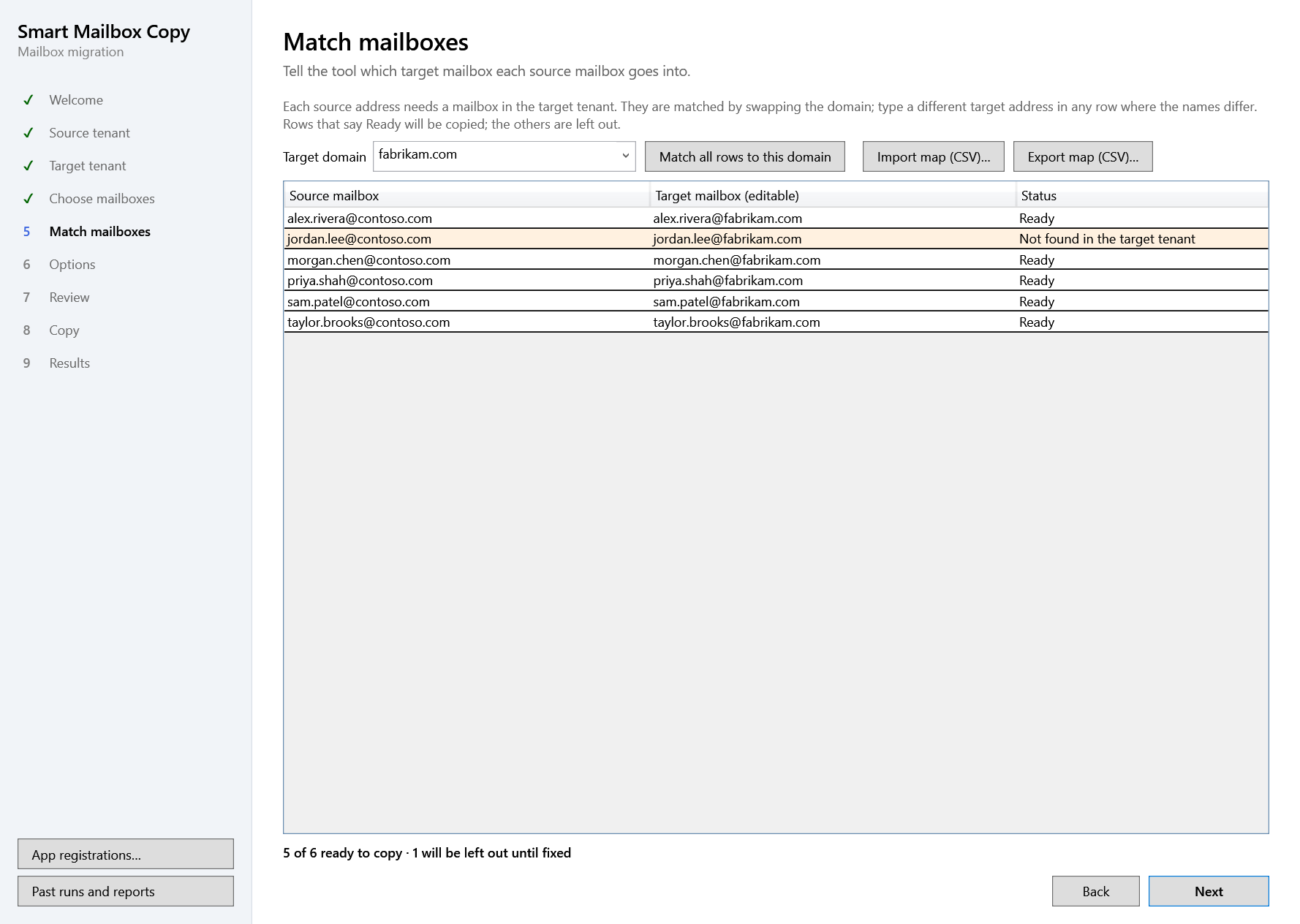
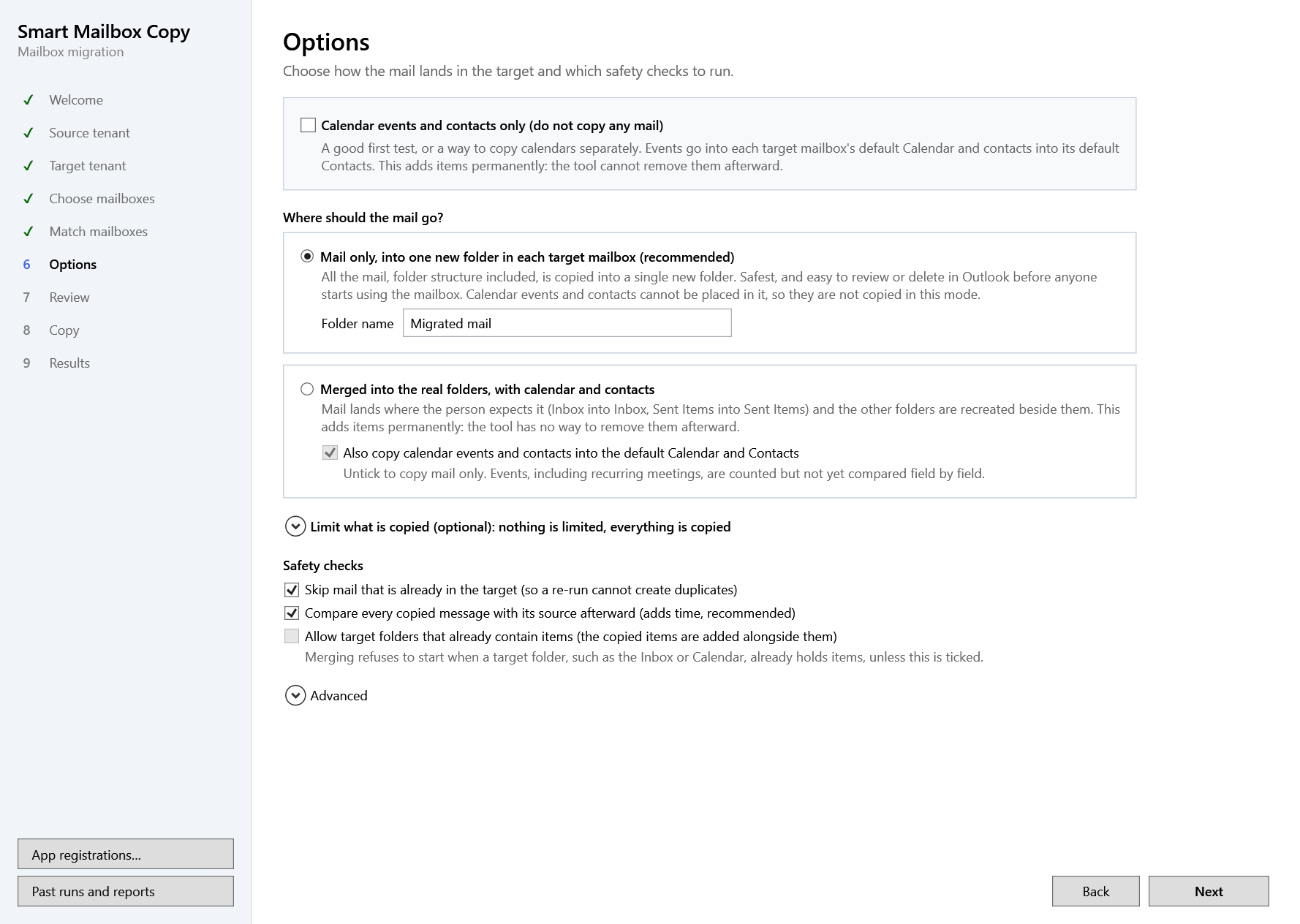
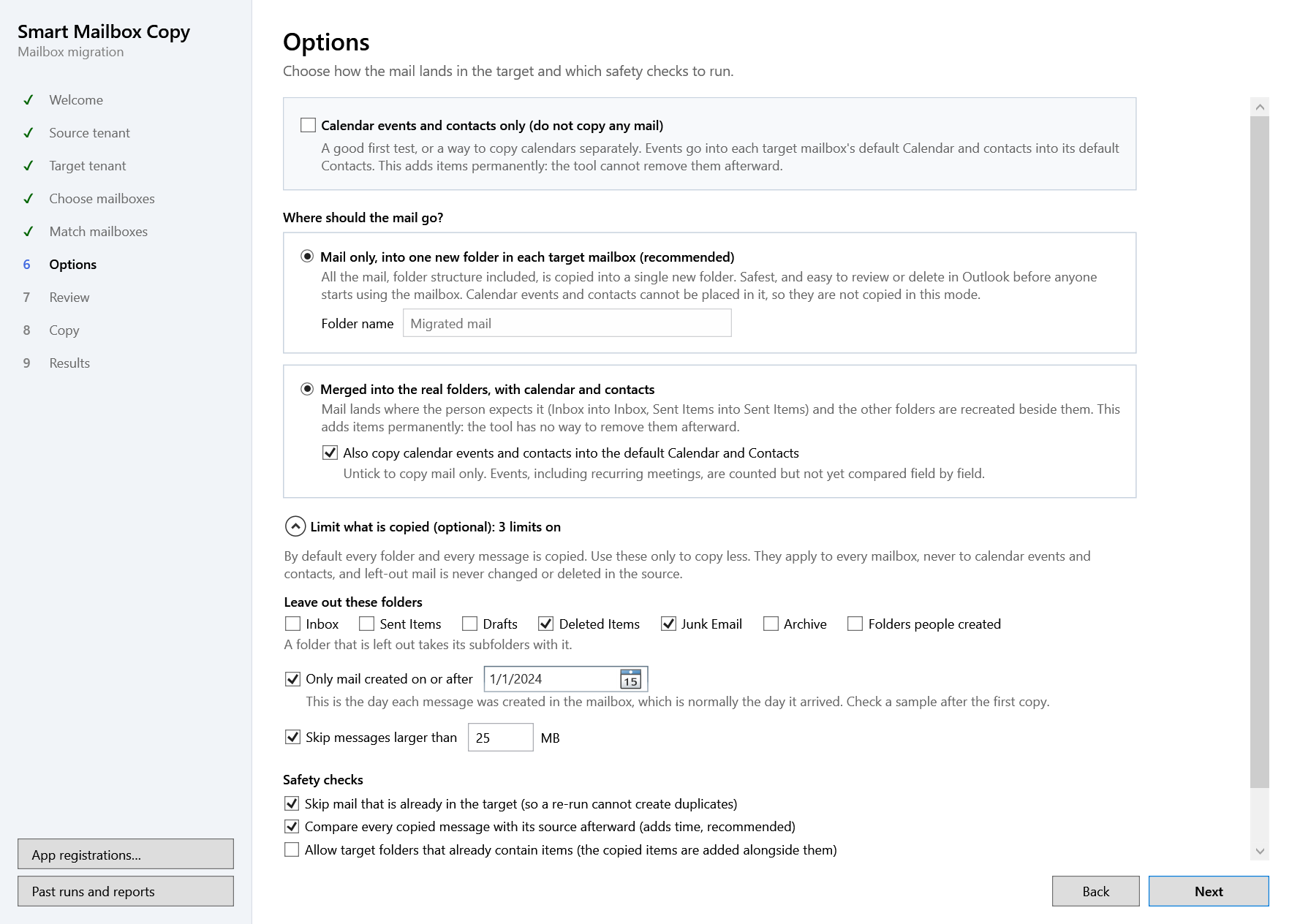
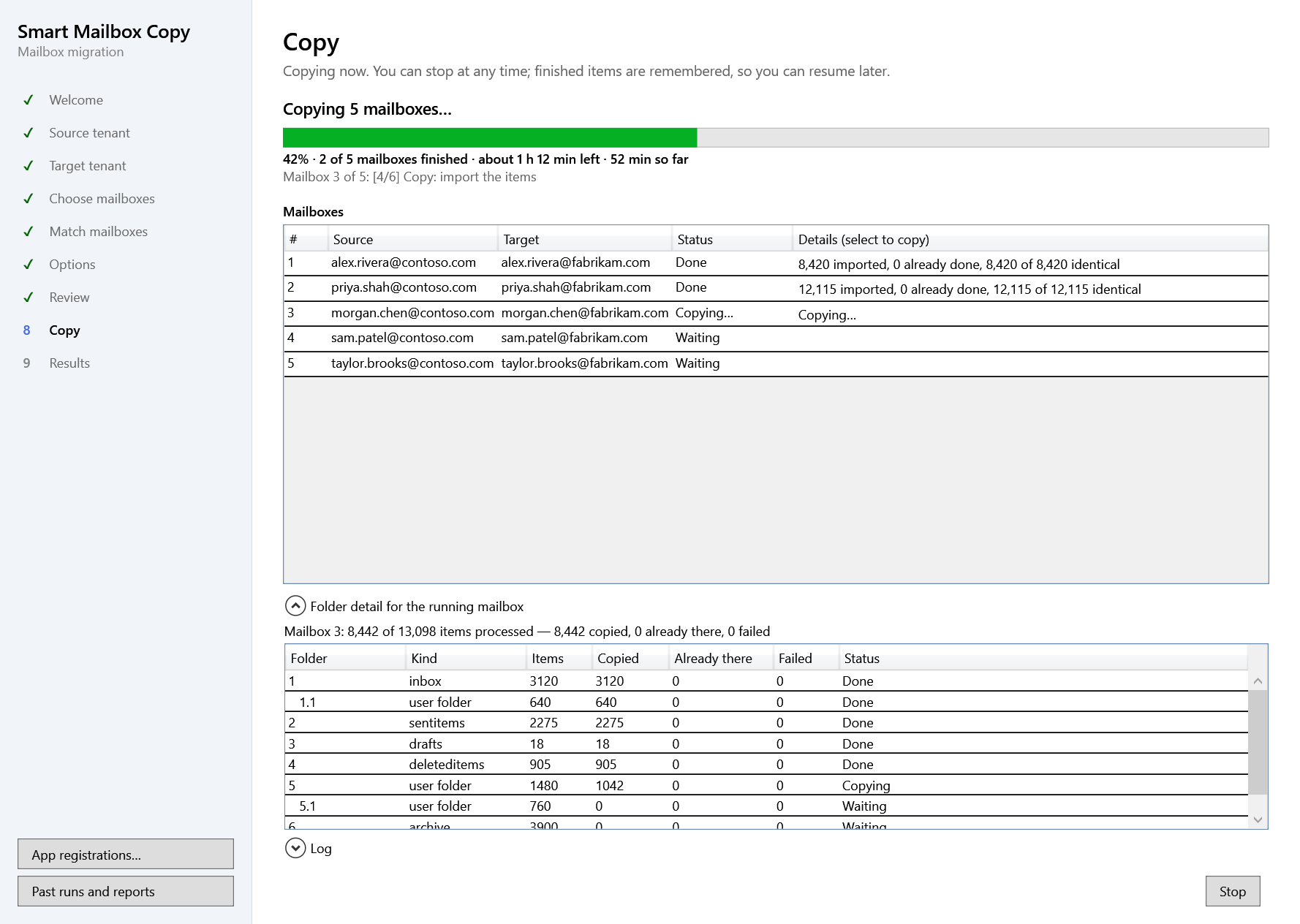
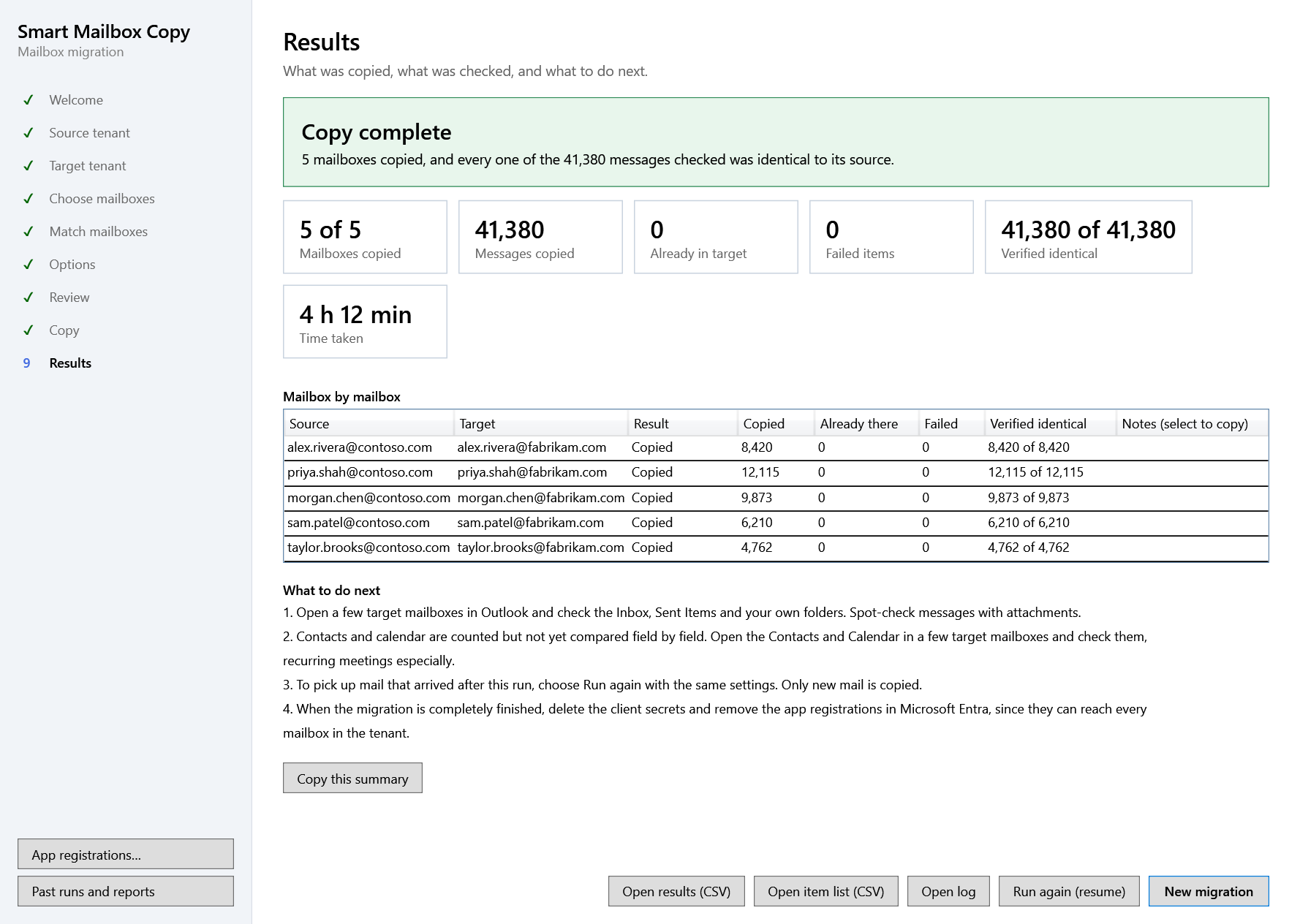
The screens use made-up example data (Contoso and Fabrikam, invented counts and times). They show what each step looks like, not measured speed.
Quick answer
How do I copy Exchange mailboxes to another Microsoft 365 tenant for free?
Smart Mailbox Copy is a free, open-source Windows tool that copies Exchange Online mail, calendar events and contacts between mailboxes, in the same tenant or in a different one. You create an app registration in each tenant, choose the source mailboxes, match each to a target mailbox, and copy either into a new folder or merged into the real folders. Dates, read state, flags, categories and attachments are kept, mail already in the target is skipped, and each copy can be verified field by field.
Scope, stated plainly: it copies Exchange Online mail, the default Calendar and Contacts. It does not copy in-place archives, group mailboxes, public folders, mail rules or mailbox permissions, and it is not a coexistence or cutover tool.
Cost: $0. MIT-licensed open source, with no trial, sign-up or per-mailbox fee.
What it does — and what it does not do
Stated plainly so you can rule Smart Mailbox Copy in or out in ten seconds.
Does
- Copy Exchange Online mail between mailboxes in one tenant or between two Microsoft 365 tenants
- Copy one mailbox, a chosen few, or every mailbox, with source-to-target matching by domain swap, row edits or CSV
- Copy the whole folder tree into one new folder per mailbox, or merge into the real Inbox, Sent Items, Drafts and other folders
- Copy the default Calendar and Contacts (merge option, or on their own)
- Keep dates, read state, flags, categories, attachments and draft state
- Skip mail already in the target, resume an interrupted copy, and verify copied messages field by field
- Limit the copy by folder, date or message size
Does not
- In-place archive mailboxes, group mailboxes or public folders
- Mail rules or mailbox permissions
- Calendars and resource settings of shared, room and equipment mailboxes, or calendars and contact folders other than the defaults
- On-premises Exchange sources, Gmail, IMAP or PST files
- Mail coexistence, free/busy sharing, domain and mail-routing cutover, or user and license provisioning
- SharePoint, OneDrive or Teams content: use Smart Copy for that
- A guaranteed SLA. Paid support plans and managed projects are available separately
Features
Built to move mail safely
One mailbox, a few, or everyone
The tool lists the source tenant's mailboxes. Filter by users, shared, room and equipment (unlicensed), guests, enabled accounts, domain or text, then tick the ones to copy.
Source-to-target matching
Addresses are matched by swapping the domain, can be edited row by row, and can be imported or exported as CSV. A row is copied only when the target mailbox exists.
Two ways to land the mail
Into one new folder in each target mailbox (the safest, easy to review), or merged into the real Inbox, Sent Items, Drafts and other folders, with the remaining folders recreated beside them.
Calendar events and contacts
The default Calendar and Contacts come across with the merge option, or on their own with the calendar-and-contacts-only option.
Full-fidelity copies
It uses Microsoft Graph's mailbox import/export API, so dates, read state, flags, categories, attachments and the genuine draft state are kept. In the tool's tests every copied message matched its source on every compared field.
Duplicate check and verification
Mail already in the target is skipped, so a re-run cannot duplicate it. Every copied message can be compared with its source, field by field, afterward.
Estimate, progress and resume
A size and time estimate before the copy, an overall progress bar with time remaining, a Stop button, and a resume journal that remembers finished items so an interrupted copy continues where it left off.
Wizard and command line
A guided Windows wizard with an explanation on every screen, plus a command line (copy, copy-tree, list-mailboxes and copy-batch) for scripting. Limit the copy by folder, date or message size if you want to.
How it works
From app registration to verified copy
- 1
Register an app in each tenant
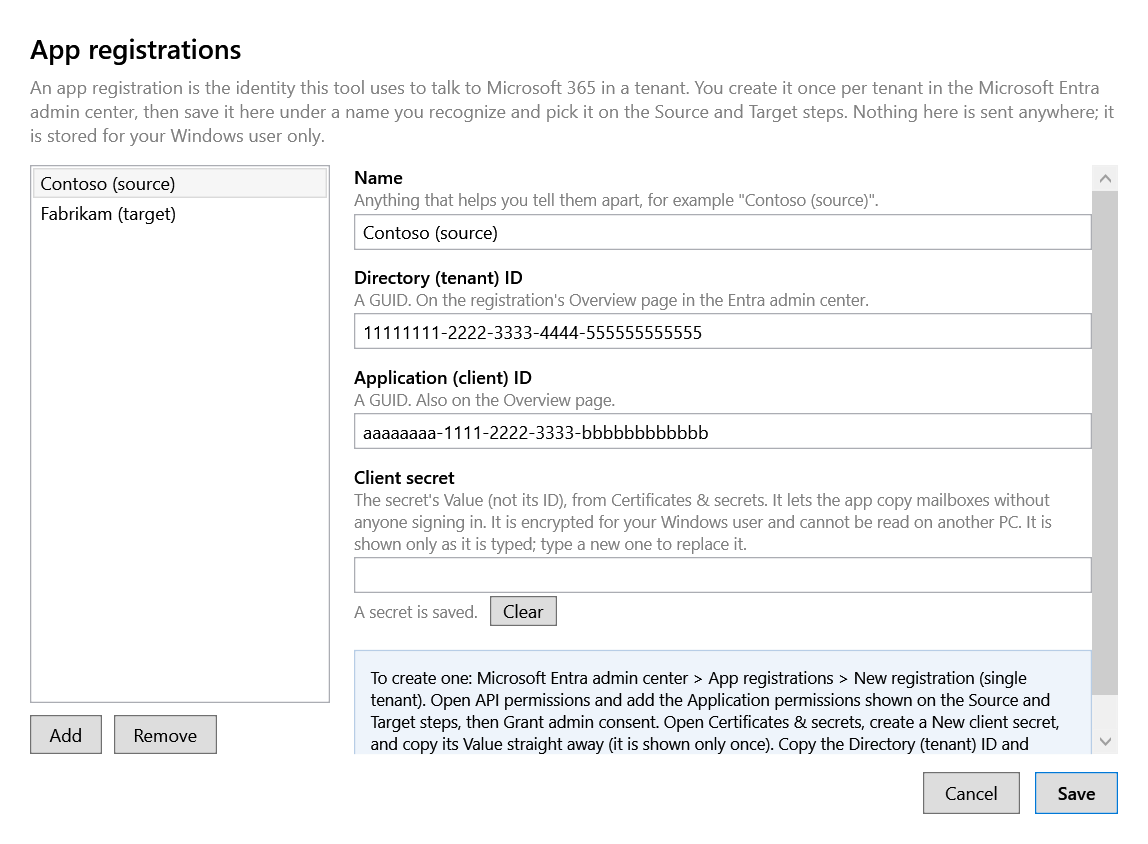
Create a single-tenant Entra ID app registration for this tool in the source and in the target, add the application permissions below, grant admin consent and create a client secret.
- 2
Start the wizard and add the registrations
Save one registration per tenant. The client secrets are encrypted for your Windows user.
- 3
Choose and match mailboxes
Pick the source mailboxes, then confirm or edit the matching target address for each. Import or export the mapping as CSV.
- 4
Set the options
Choose a new folder or a merge into the real folders, whether to include calendar and contacts, and any folder, date or size limits.
- 5
Review, copy and verify
Check the size and time estimate, start the copy, then use the Results screen: totals, a mailbox-by-mailbox table, and exports of a results CSV, a per-item list and the log.
The wizard walks through Welcome, Source tenant, Target tenant, Choose mailboxes, Match mailboxes, Options, Review, Copy and Results, with a short explanation on every screen. The full setup is in the README and the install guide.
Permissions
Application permissions, one app per tenant
The wizard signs in with an app registration in each tenant, so it can reach other people's mailboxes without their passwords. These are Microsoft Graph application permissions and need admin consent.
| Tenant | Application permissions |
|---|---|
| Source (read and export only) | Mail.Read, MailboxItem.ImportExport.All, MailboxItem.Read.All, MailboxFolder.Read.All, User.Read.All |
| Target (import only) | Mail.ReadWrite, MailboxItem.ImportExport.All, MailboxItem.Read.All, MailboxFolder.Read.All, User.Read.All |
The command line can also copy a single mailbox with an interactive sign-in, which reaches only the signed-in person's own mailbox. See the Microsoft Graph permissions overview for every tool in the suite.
Source is only read, target is only added to
Every request is checked against a guard before it is sent. The source side is read-only (plus the export call, which only reads). The target side can create folders under the destination, create an import session and read back what the run created. The tool never deletes from either side.
Runs on your Windows PC
The tool has no server of its own. Mail travels from the source tenant to the computer running the tool and on to the target tenant, and no vendor cloud sits in between.
App registrations you control
It signs in with an app registration in each tenant, not as a person, so it can reach other people's mailboxes without their passwords. Application permissions cover every mailbox in the tenant unless an Exchange admin restricts them, so use registrations made for this tool, keep the secrets private and delete them when the migration is finished.
Logs hide content
Logs and reports hide addresses and secrets and never print subjects, sender names, folder names or attachment names. A never-write-to list refuses any mailbox you mark as protected.
The migration package
Smart Copy + Smart Mailbox Copy + Smart Permissions
A tenant move is more than files. Used together, these three free tools cover the content, the mailboxes and the access: SharePoint, OneDrive and Teams, Exchange mail and calendars, and who can reach what before and after the move.
Smart Copy
SharePoint, OneDrive and Teams
Sites, libraries, lists and pages with version history and authors; OneDrive and Teams files; Microsoft Forms and Power Automate flows. Smart Copy also copies a team's channels, members and, optionally, its messages, and group chats.
See Smart CopySmart Mailbox Copy
Exchange Online
Mail, calendar events and contacts, for one mailbox, a chosen few or everyone, with dates, read state, flags, categories and attachments kept. Mail already in the target is skipped, so a re-run does not duplicate it.
You are here
Smart Permissions
Access, before and after
A read-only audit of who can reach what in SharePoint. Run it on the source to decide what access is worth recreating, and on the target afterward to confirm who can actually open the migrated content.
See Smart PermissionsA sensible order
- Audit access on the source with Smart Permissions, and clean up what should not move.
- Copy SharePoint, OneDrive and Teams content with Smart Copy, and review its verification report.
- Copy mailboxes and calendars with Smart Mailbox Copy, starting with a small pilot group.
- Run Smart Permissions on the target to confirm access matches what you intended.
Follow the SharePoint, Teams, and Exchange tenant copy walkthrough for pilots, workload limits, and verification before a separate cutover.
Not covered by the suite: on-premises SharePoint or Exchange, file shares and non-Microsoft sources, in-place archive and group mailboxes, public folders, mail rules and mailbox permissions, the domain and mail-routing cutover, and a vendor-managed project with a support contract. If you want a person to plan and run the move, see our consulting services.
FAQ
Frequently asked questions
Comparisons
Compare and plan
Where free tools cover a tenant move, and where a paid platform still fits.
Free ShareGate alternative
Where Smart Copy and Smart Mailbox Copy cover the work, and where ShareGate still fits.
Read comparisonFree AvePoint alternative
A local, open-source option next to AvePoint's Fly and Elements platform.
Read comparisonFree Cloudiway alternative
Tenant-to-tenant moves with mail, using free tools on your own PC.
Read comparisonSharePoint migration reference
The full guide to planning a SharePoint, OneDrive, Teams and mail migration.
Read comparisonGet your first result in about 10 minutes
Download Smart Mailbox Copy, follow the step-by-step install guide, and run it against a real site the same afternoon. Nothing to license, nothing to renew.
- Download the .sppkg package from the latest release.
- Upload it to your tenant App Catalog.
- Add the web part to a SharePoint page.
Email me when a new release ships
No marketing spam. One short email when a new release ships. You can unsubscribe anytime.